Angat ang Ganda at Galing ng Camiling Angat ang Ganda at Galing ng Camiling Angat ang Ganda at Galing ng Camiling Angat ang Ganda at Galing ng Camiling Angat ang Ganda at Galing ng Camiling Angat ang Ganda at Galing ng Camiling Angat ang Ganda at Galing ng Camiling Angat ang Ganda at Galing ng Camiling Angat ang Ganda at Galing ng Camiling Angat ang Ganda at Galing ng Camiling Angat ang Ganda at Galing ng Camiling Angat ang Ganda at Galing ng Camiling
National Youth Commission seal Municipality of Camiling, Tarlac seal YORP seal

National Youth Commission · Local Youth Development Office

Getting your org
stamped & registered
with YORP

An unofficial, plain-language walkthrough of the Youth Organization Registration Program — ten stops, from your first email to your renewal date, three years out.

Municipality of Camiling, Tarlac

“Angat ang Ganda at Galing ng Camiling”

Visitor – – – – – counted live
10stops on the route
1–6days to process
3years per certificate

Before you start

Pack these before you leave the gate

Most items below have downloadable templates on the YORP Portal (yorpnyc.org.ph). Have digital copies ready — you'll upload them in Step 5.

City / Provincial / Inter-regional

Coordinate with your Local Youth Development Office (LYDO) first.

Regional / National / Federation

Register directly with NYC — this is the walkthrough below.

LYDO staff

Request an account at yorpnyc.org.ph → "Request LYDO Account."

The registration route

Ten stops, start to finish

Follow the dotted line. Each stop is stamped as you reach it — just like your application will be, once NYC signs off.

  1. 01

    Start here

    Verify Your Email

    • Go to yorpnyc.org.ph/yorppanel/Regcon/Verify
    • Enter your organization's official email address — not a personal one.
    • Type the Captcha code shown, or click "Random" to generate a new one.
    • Click Submit.

    TipUse an email your organization checks regularly. The Secretariat sends every update and the registration link here, and the link never expires if you need to re-register.
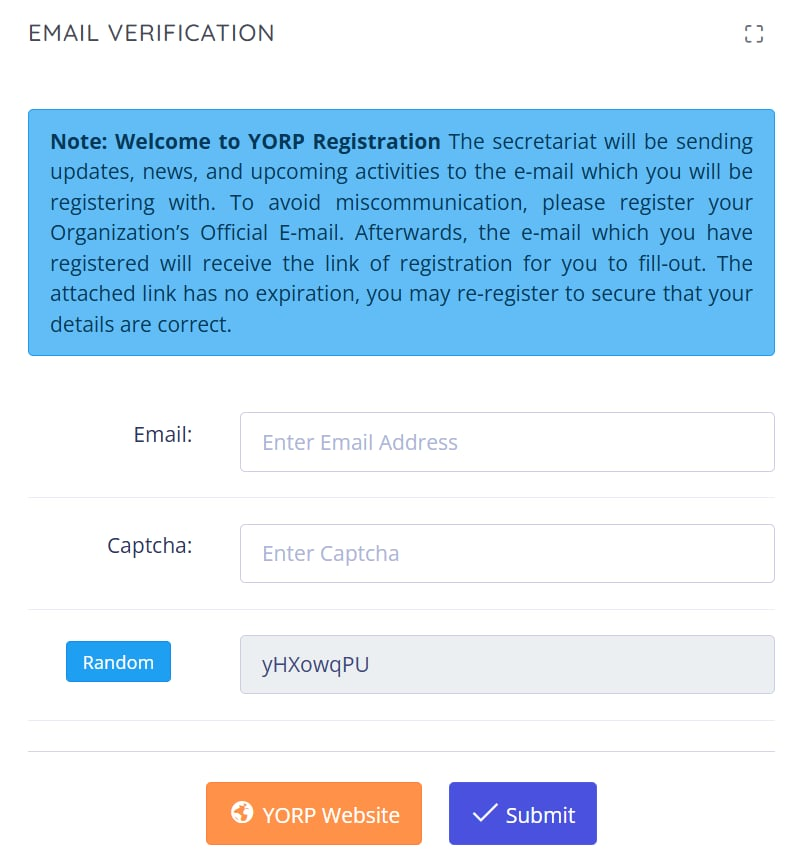
    YORP portal screenshot — Verify Your Email 🔍 Tap to zoom
  2. 02

    Check your inbox

    Open the Registration Link

    • Check the inbox of the email you just submitted.
    • Look for a message from yorp@nyc.gov.ph, subject "NYC YORP Panel Web System."
    • Click HERE! inside the email to open the registration form.

    TipNo email after a few minutes? Check spam first, then repeat Step 1 with the correct address, or call (02) 8371-4603.
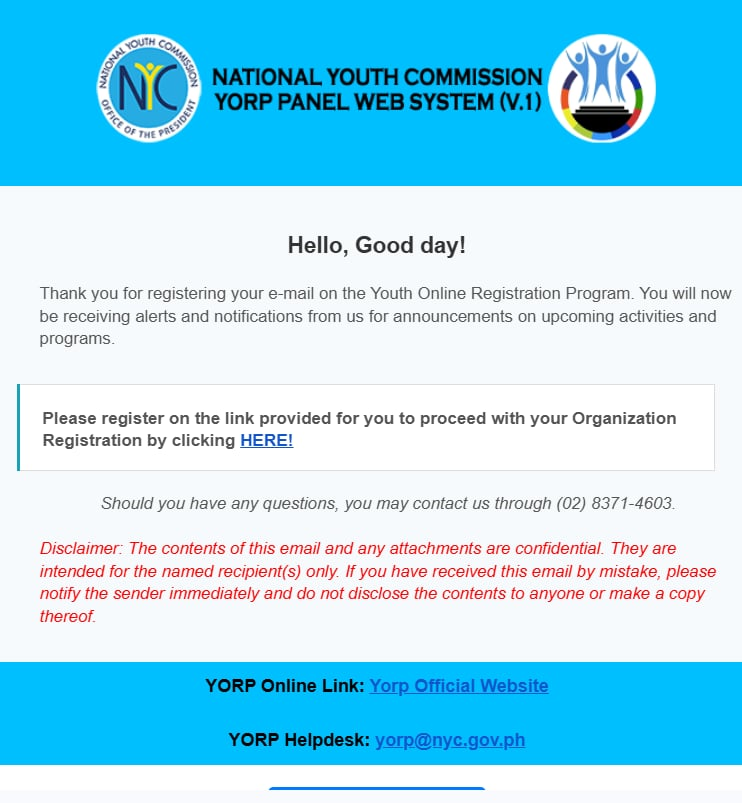
    YORP portal screenshot — Open the Registration Link 🔍 Tap to zoom
  3. 03

    Form step 1 of 5

    Organization Profile

    • Fill in: Name of Organization, Complete Address, Telephone Number, Cellphone Number, Number of Members, and Date Established.
    • Select your location: Island, Region, Province, Municipality, and Barangay.
    • Select your Major Classification, Sub-Classification, and Organization Level.
    • Choose your PYDP Center — you may select more than one.
    • Write a Brief Description and Objectives of your organization.
    • Click Next.

    TipEvery field marked with a red asterisk is required — the form blocks you from continuing without them.
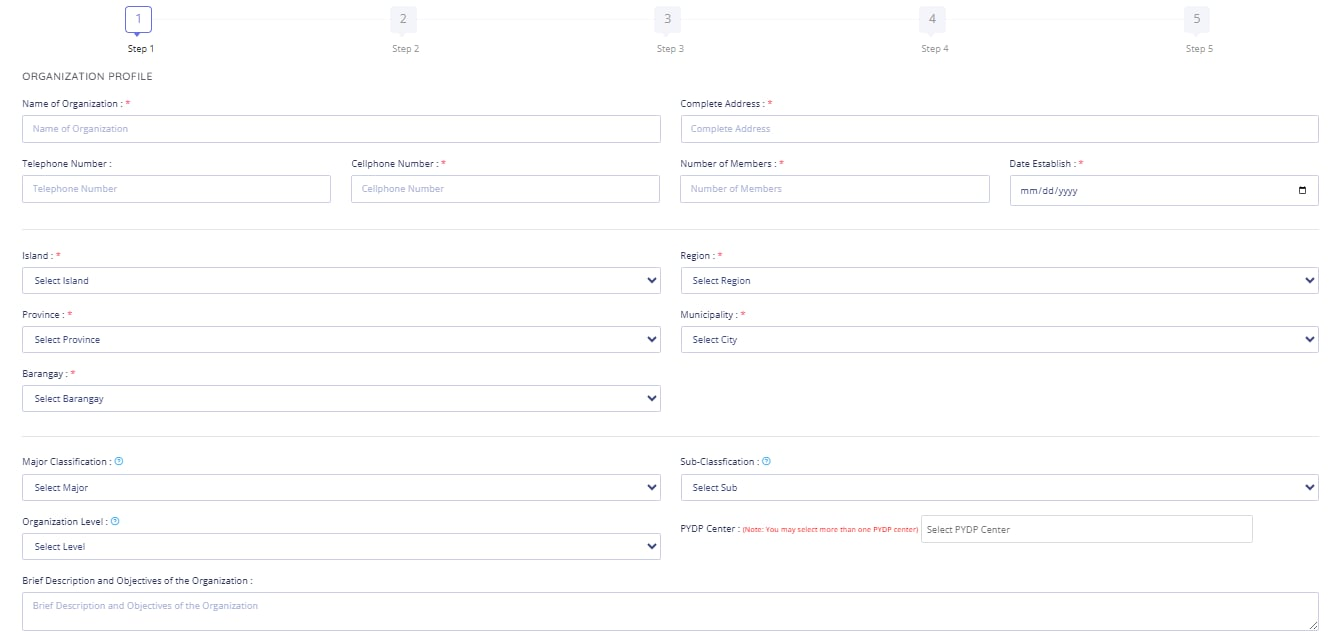
    YORP portal screenshot — Organization Profile 🔍 Tap to zoom
  4. 04

    Form step 2 of 5

    Leadership & Membership Info

    • Head of Organization (required): Family Name, Given Name, Middle Name, Contact Number, Email Address.
    • Adviser of the Organization (optional): same fields, if applicable.
    • Click Next.

    TipUse the Head of Organization's direct contact details — the Secretariat may reach out to this person to verify your application.
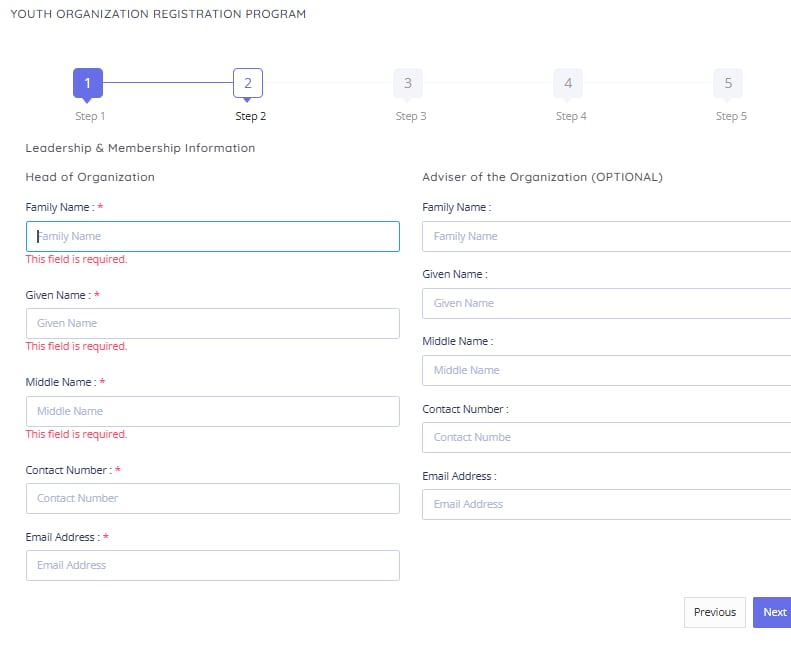
    YORP portal screenshot — Leadership & Membership Info 🔍 Tap to zoom
  5. 05

    Form step 3 of 5

    Submit to LYDO & Upload your Documents

    • Submit your Registration Form (PDF), Directory of Officers & Advisers (PDF), List of Members in Good Standing (Excel file), and Constitution and By-Laws (PDF), to localyouthdevtofficecamiling@gmail.com to receive your LYDO Certification needed for uploading.

    TipEach file must be under 1MB (1024KB) and in PDF format — except the List of Members in Good Standing, which must be an Excel file.
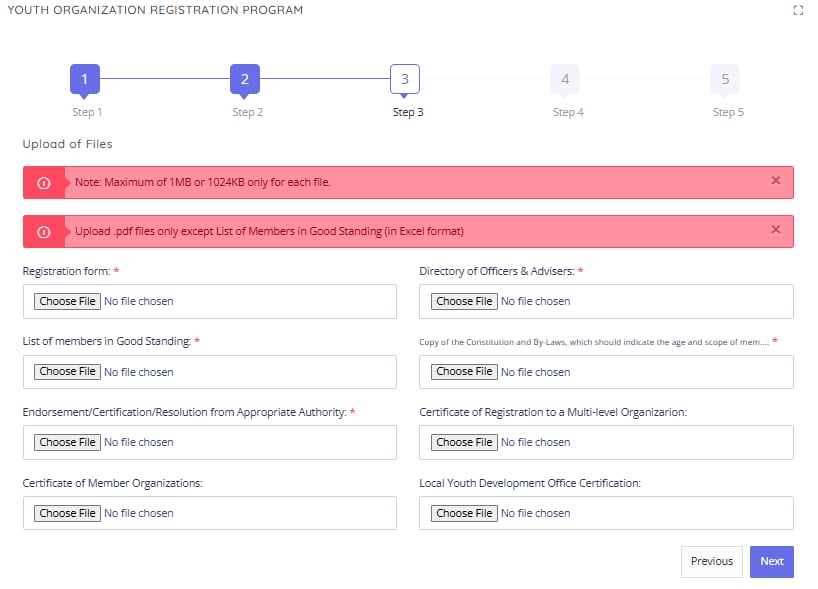
    YORP portal screenshot — Submit to LYDO & Upload your Documents 🔍 Tap to zoom
  6. 06

    Form step 4 of 5

    Consent & Survey

    • Read the consent statement carefully — under RA 8044 and RA 10742, you confirm your information is true, consent to it being published in the official YORP registry, and authorize NYC to process it.
    • You also confirm you've read the 2017 YORP Guidelines and understand violations may lead to suspension or revocation.
    • Answer: "What trainings are you interested to attend?"
    • Answer: "How did you know about YORP?"
    • Click Next.

    TipTake a moment on the consent text — it's the legal basis for your registration and how your data will be used.
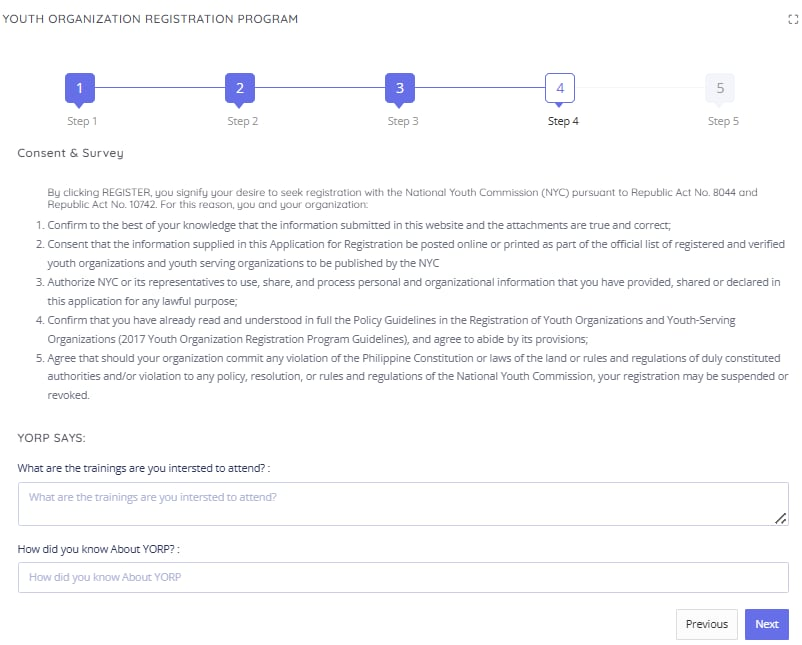
    YORP portal screenshot — Consent & Survey 🔍 Tap to zoom
  7. 07

    Form step 5 of 5

    Feedback Survey & Submit

    • Optional: take the NYC Service Feedback Survey (about 3–5 minutes).
    • Click Submit to send in your completed application.

    TipAfter submitting, you can simply close the survey tab — your application has already been sent.
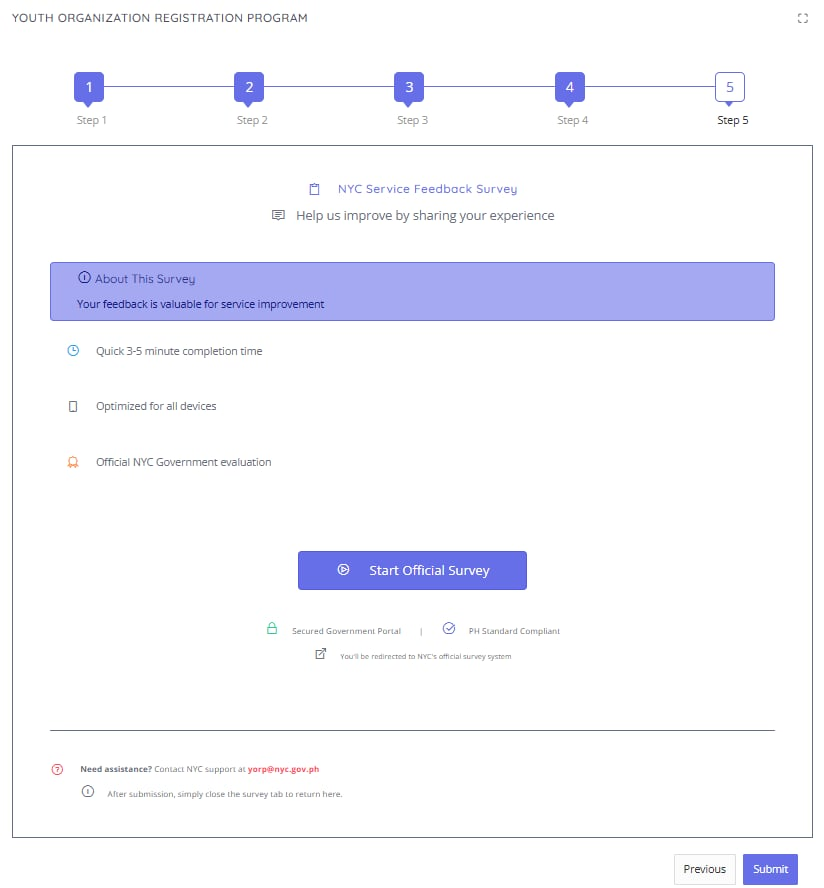
    YORP portal screenshot — Feedback Survey & Submit 🔍 Tap to zoom
  8. 08

    Processing: 1–6 days

    Wait for Confirmation & Verification

    • Check the email you registered with for a confirmation that your application was received.
    • The YORP Secretariat may contact your officers or members directly to verify your submission.
    • If a document is missing or deficient, you'll get a Notice of Denial / Request to Submit Missing Documents — comply within 10 days or the application is forfeited.

    TipNo confirmation email despite complete documents? The email you registered may be incorrect — register again, or email yorp@nyc.gov.ph.

  9. 09

    Access your account

    Registration Approved

    • A second confirmation email tells you registration is successful, and includes your username and password for the YORP portal.
    • Log in via Organization → Log In using those credentials.
    • View your organization's profile, update your info, and check your status in the national registry.
    • Submit the YORP Certificate of Registration to localyouthdevtofficecamiling@gmail.com for LYDO directory updating.

    TipNew registrations are endorsed by batch to the Commission Proper for a Resolution — your e-certificate is released by email once it's signed.

  10. 10

    Ongoing — every 3 years

    Stay Compliant & Renew

    • Annual reports: submit yearly accomplishment reports and keep your info updated via the YORP portal.
    • Renewal: your certificate is valid for 3 years — file for renewal with required documents before it expires.
    • Stay compliant: avoid violations (missed reports, misuse of the NYC name, illegal acts) — these risk suspension or revocation.
    • Local recognition: your LYDO may issue a separate local certificate once local verification is complete.

    TipKeep your login and certificate on hand — you'll need both for annual reporting and renewal.

Good to know

Your URN & the YORP Advisory

YO-

Youth Organization

For a youth-led organization with members aged 15–30.

YSO-

Youth-Serving Organization

For an organization with youth as its major beneficiary.

YORP Advisory

Request an endorsement for your events by emailing yorp@nyc.gov.ph with your program details — signed by the Chairperson and CEO.

Member Benefits

Free training, use of the YORP seal, priority for NYC consultations, and a seat in your LYDC.

Take it offline

The full guide, stamped and ready to print

Every stop on this page, laid out as a document — hand it to a co-officer, print it for a chapter meeting, or keep it for your files.

⬇ Download the Word guide (.docx)